OFH+ has four integrated analog input channels, AIN0–AIN3, for control-position sensors and other instrumentation. The configuration page displays each channel’s voltage and calibrated value.
The inputs are ideally suited to potentiometers (pots) used to measure control position. We recommend a 1 kΩ to 10 kΩ linear potentiometer with travel appropriate for the control being measured.
Analog connector pinout
OFH+ has a three-row, 15-pin female D-sub connector. Use a matching male connector for the sensor harness.
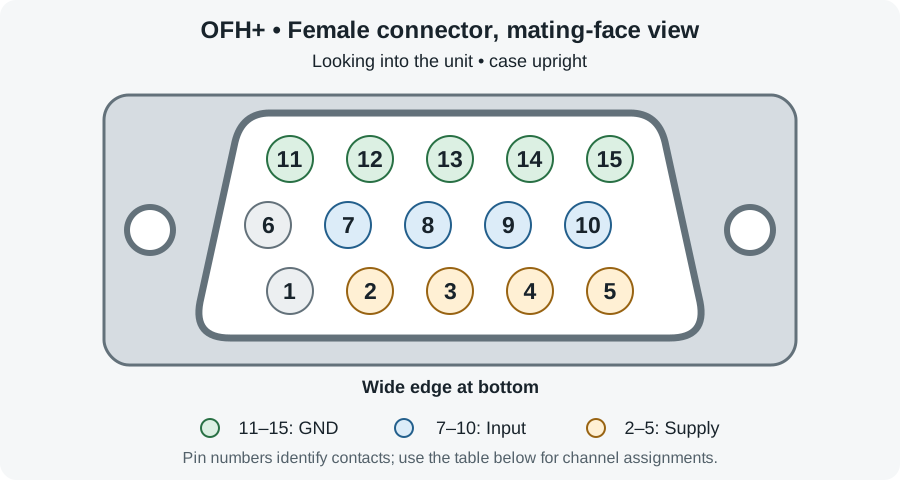
The diagram looks into the connector on OFH+, with the case upright and the connector’s wide edge at the bottom. It is not a view of the harness wiring side.
| Channel | Sensor supply pin | Analog input pin | Ground pins (GND) | Input range |
|---|---|---|---|---|
| AIN0 | 2 | 7 | 11, 12, 13, 14, or 15 | 0–2.048 V |
| AIN1 | 3 | 8 | 11, 12, 13, 14, or 15 | 0–2.048 V |
| AIN2 | 4 | 9 | 11, 12, 13, 14, or 15 | 0–2.048 V |
| AIN3 | 5 | 10 | 11, 12, 13, 14, or 15 | 0–2.048 V |
Each listed sensor supply provides +2.048 V at a maximum of 100 mA. Pins 11, 12, 13, 14, and 15 are ground (GND) and can be used for any analog channel.
Check connector pin numbers carefully when assembling the harness; the mating face and wiring side are mirror images.
Connect a potentiometer
A potentiometer has two terminals at the ends of its resistive track and a wiper terminal that moves along the track. Connect it as a voltage divider:
- Connect one end terminal to the channel’s +2.048 V sensor supply.
- Connect the other end terminal to GND.
- Connect the wiper (signal) to the channel’s analog input.
For example, connect an AIN0 potentiometer to pin 2 (supply), pin 12 (ground), and pin 7 (wiper signal). Any of the listed GND pins can provide the ground connection.
Wired this way, the wiper voltage stays between ground and the supplied 2.048 V throughout the potentiometer’s travel, matching the analog input range without an external supply or voltage scaling. Swapping the two end-terminal connections reverses the direction in which the voltage changes.
Potentiometer resistance and supply current
The current through the resistive track depends on its total end-to-end resistance:
Current = supply voltage ÷ resistance, or I = 2.048 V ÷ R.
| Potentiometer resistance | Calculation | Supply current |
|---|---|---|
| 1 kΩ | 2.048 V ÷ 1,000 Ω | 2.048 mA |
| 5 kΩ | 2.048 V ÷ 5,000 Ω | 0.4096 mA |
| 10 kΩ | 2.048 V ÷ 10,000 Ω | 0.2048 mA |
All of these draw well below the 100 mA supply limit. Moving the wiper changes the signal voltage, while the end-to-end resistance and track current remain the same. Higher resistance reduces the current drawn from the supply.
For other sensor types, connect the sensor output to the analog input and its ground to GND. Use the provided supply only if the sensor supports 2.048 V operation. Keep its output within 0–2.048 V and its supply current within 100 mA.
Configure each channel
Open the configuration page and find Analog Input Settings.
- Set the shared Cutoff Frequency (Hz) if needed. The allowed range is 0.001–20 Hz; leave it at its default unless you need different filtering.
- For each connected channel, select Control Type: ELEVATOR, AILERON, RUDDER, THROTTLE, MIXTURE, PROP, FLAPS, or CUSTOM.
- Select Calibration Type: THREE POINT or TWO POINT. Three-point calibration includes a center point; two-point calibration uses the two endpoints.
- Wait for All changes saved before capturing calibration points.
Each channel has low, center, and high calibration voltages with Valid checkboxes. These fields are editable and save automatically. Use the capture procedure below to obtain values from the connected sensors; marking a point valid is not a substitute for measuring it.
The calibrated output is 0–1 for two-point calibration. Three-point calibration produces −1 at left/forward, 0 at center, and +1 at right/back. These values are normalized positions, not angles in degrees.
Capture calibration points
Perform calibration on the ground with the aircraft secured and the controls safe to move. Each capture records that point for all applicable channels. Position all connected controls appropriately before each capture, including channels you calibrated previously.
- Hold all controls at their left/forward endpoint. Select Capture Left/FORWARD and hold them steady until Analog calibration complete appears.
- For channels using three-point calibration, position the controls at center. Select Capture Center and hold steady until completion is confirmed.
- Hold all controls at their right/back endpoint. Select Capture RIGHT/BACK and hold steady until completion is confirmed.
- Review the refreshed calibration values and validity indicators for each channel.
- Move the controls through their range and check that the displayed AIN0–AIN3 Val readings respond as expected.
Each capture samples the inputs for about 2 seconds. Analog settings are temporarily disabled during capture and the results save automatically. After the last capture, let the navigation system reinitialize and check for a solid Status light before flight.
If calibration does not complete
- If capture buttons are disabled, wait for the initial settings to load and for pending configuration changes to finish.
- If a request is rejected, check the settings and connection, then try the capture again.
- If the connection is lost, completion is not confirmed. Reconnect and review the refreshed values before accepting the calibration.
- If Refresh appears, use it to retrieve the device’s analog settings. Repeat a capture if its result remains uncertain.
After restoring defaults or changing sensors, review and verify the calibration before recording another flight.