Most users can leave the configuration settings at their defaults. Review the mounting orientation and log format for your installation and analysis application; you may also want to enter aircraft details or an ACROWRX key. See Recording and reviewing data for help choosing a log format.
The sensor calibration, filter, and initialization settings below are provided for advanced use. You do not need to adjust them for normal operation.
Open the configuration page
Join the OnFlight Hub Wi-Fi network. The network name may be appended with the OnFlight Hub’s serial number. No password is required. Open http://192.168.23.1 to view real-time data and change settings.
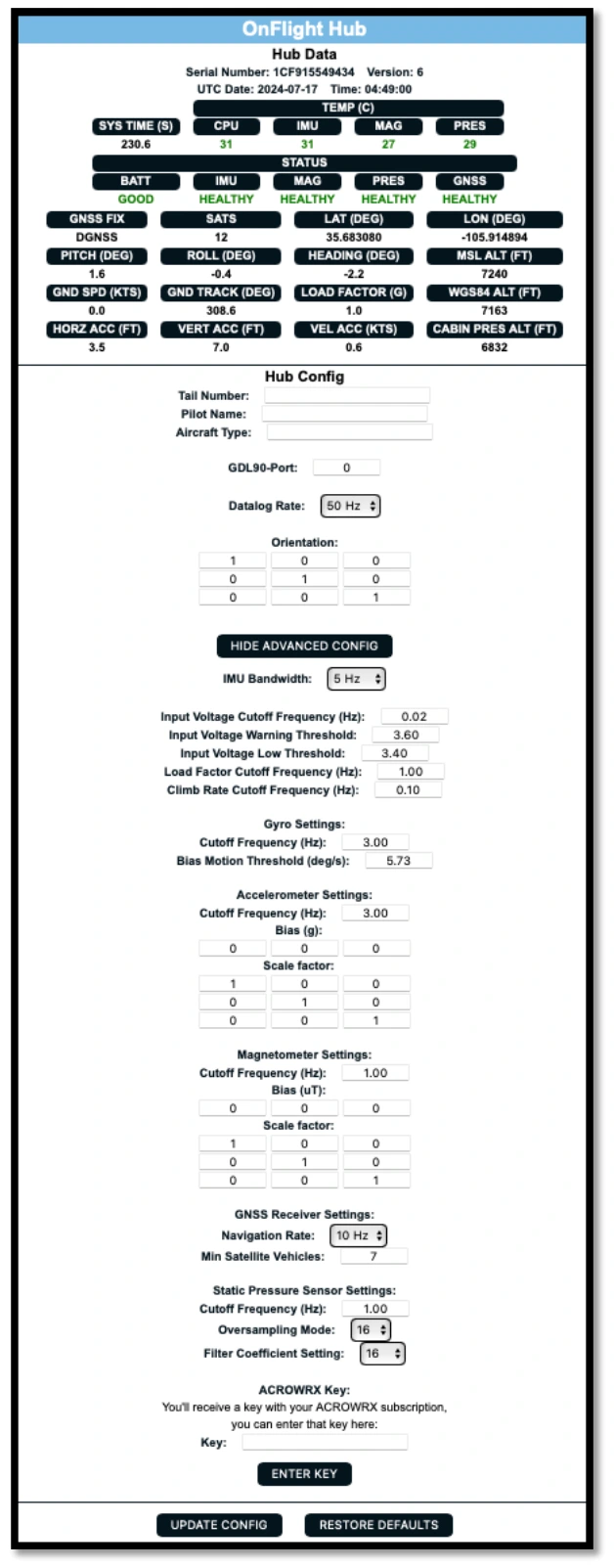
Example from firmware 6. Available settings vary by firmware version.
The top of the page gives live data from the sensors and inertial navigation system (INS), as well as the OnFlight Hub serial number, software version number, and hardware version number. If just a version number is given, then that is the software version number and the hardware is version 1.
After changing any configuration setting on this page, select Update Config to apply your changes. Use the Restore Defaults button to restore the default configuration. Changes may take several seconds to take effect; wait until the live data begins updating again.
If external sensors are used, their data will also be displayed on this webpage.
Aircraft metadata
Firmware 6 and later. Set the aircraft tail number, pilot name, and aircraft type. These values are stored in the logs and can be used by converters and analysis software to organize flights.
GDL 90 port
This specifies the port used for GDL 90 communication with apps such as ForeFlight or Garmin Pilot. The default is 4000. Change it only if your receiving application requires a different port.
Datalog rate
Firmware 6 and later. Select 50, 25, 10, or 5 Hz. A lower rate reduces file size and allows use of lower-performance SD cards. The Hub itself continues to run at 50 Hz; this setting changes only the rate written to the card.
Log format
Select OnFlight output for .onflight files to upload to FlySto or convert for CloudAhoy, CSV, or MATLAB. To record .acrowrx files for ACROWRX, first enter your ACROWRX key and select Enter Key, then select ACROWRX output.
See Recording and reviewing data for how to use each file format.
File timestamps
Firmware 10 and later. Set the UTC offset to adjust the log files’ creation and last-modified dates and times on the microSD card from UTC to local time. This setting affects only the file timestamps; it does not change timestamps within the recorded flight data.
Orientation
Set the rotation matrix to map the installed Hub axes to the aircraft frame. See Installation and orientation.
IMU bandwidth
The inertial measurement unit (IMU) contains the accelerometer and gyro. Set its internal low-pass filter to 5, 10, or 20 Hz.
Input voltage
When a charger is connected, input voltage is the USB charging voltage. Otherwise, it is battery voltage. The signal is noisy and heavily filtered. Configure its low-pass filter cutoff frequency and the warning/low battery thresholds.
Load factor and climb rate
The Hub uses an extended Kalman filter (EKF) to combine accelerometer, gyro, and satellite navigation measurements into estimates of aircraft attitude, velocity, and position.
Load factor uses low-pass-filtered Z-axis acceleration after removing real-time estimates of the sensor bias, with the positive direction up. Climb rate uses EKF vertical velocity, low-pass filtered and converted to feet per minute. Configure the cutoff frequency for each output.
Gyro
Initial gyro biases are estimated while the Hub is stationary. A configurable threshold rejects gyro measurements that indicate motion during bias estimation. The output low-pass filter cutoff frequency is also configurable and is applied after removing real-time estimates of the sensor biases.
Accelerometer
The accelerometer scale matrix and bias vector correct scale-factor errors, sensor-axis misalignment, cross-axis sensitivity, and zero offsets before measurements enter the EKF. The output low-pass filter cutoff frequency is configurable and is applied after the EKF to provide smoother outputs for analysis software.
Magnetometer
A scale matrix and bias correct raw magnetometer measurements. The scale matrix and bias are used to correct for hard and soft iron biases and are applied before the EKF. The low-pass filter cutoff frequency is configurable. The magnetometer is used to initialize the EKF; subsequent EKF updates use the IMU and global navigation satellite system (GNSS) data.
For both accelerometer and magnetometer calibration:
v_corrected = S × (v_measured - v_bias)
S is a 3 × 3 matrix and defaults to the identity matrix.
GNSS
Set the GNSS navigation rate to 1, 5, or 10 Hz. Higher rates generally improve INS performance.
The minimum satellite count controls the GNSS solution accepted for initialization. Higher counts can improve the initial solution but increase initialization time.
Firmware 8 also introduced horizontal and vertical accuracy thresholds. These criteria govern both INS initialization and acceptance of subsequent GNSS measurement updates.
Firmware 9 introduced a scale factor for the real-time covariance estimate used in the EKF. This setting adjusts how much the filter trusts GNSS measurements when updating its navigation estimates. A reachability distance was also added. GNSS measurements that are more than this distance away from the current position estimate are discarded. This helps reject implausible GNSS position measurements before they affect the navigation estimates.
Static pressure
Configure the static-pressure low-pass filter cutoff frequency, oversampling, and filter coefficient.
ACROWRX key
Enter the key supplied with an ACROWRX subscription and select Enter Key to enable selection of the ACROWRX data format. When the key is applied successfully, the configuration page title changes to OnFlight + ACROWRX.