OnFlight Hub can receive measurements from compatible external sensors, display them on the Configuration webpage, record them in flight logs, and broadcast them over UDP.
Bluetooth connections
Turn on your sensors before turning on OnFlight Hub. OnFlight Hub searches for compatible Bluetooth sensors during the first 10 seconds after power-on.
If a sensor is not found during this period, make sure it is ready to connect and restart OnFlight Hub. If an established connection is lost, OnFlight Hub attempts to reconnect for 120 seconds.
To check sensor data, connect to OnFlight Hub’s Wi-Fi network and open http://192.168.23.1. See Configuration for more information.
Stadia AGL altimeter
Supported with firmware 4 and later.
OnFlight Hub supports the Skeeter Enterprises Stadia portable altimeters over Bluetooth, providing above-ground-level (AGL) measurements.
Follow the documentation for your Stadia model for mounting instructions, operating limits, and charging.
Setup and altitude zeroing
- Mount Stadia according to its installation instructions.
- With the aircraft stationary on the ground, turn on Stadia.
- Ensure that no other device, such as a phone or tablet, is connected to Stadia.
- Turn on OnFlight Hub.
- After connecting, OnFlight Hub collects 2 seconds of AGL measurements to estimate and subtract the mounting height. Keep the aircraft stationary on the ground during this step.
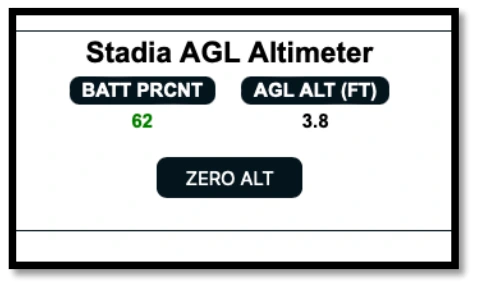
- Check the AGL measurement and battery percentage on the Configuration webpage.
To reset the mounting-height offset, select ZERO ALT with the aircraft stationary on the ground.
Bluetooth heart rate sensors
Supported with firmware 6 and later.
OnFlight Hub receives heart rate measurements from compatible straps and watches.
- Turn on the sensor and enable Bluetooth heart rate broadcasting.
- Turn on OnFlight Hub.
- Check the heart rate measurement on the Configuration webpage.
Check your sensor’s instructions for enabling Bluetooth broadcasting. Turning on a watch or starting an activity may not enable this feature.
Troubleshooting
| Symptom | What to do |
|---|---|
| Sensor does not connect. | Make sure the sensor is powered on and ready to connect before restarting OnFlight Hub. For Stadia, disconnect any other connected device. For a heart rate sensor, enable Bluetooth heart rate broadcasting. |
| Connection is lost. | Check the sensor’s battery and distance from OnFlight Hub. Allow up to 120 seconds for reconnection. If it does not reconnect, make sure the sensor is ready and restart OnFlight Hub. |
| AGL does not read zero on the ground. | Check Stadia’s installation and measurement path. With the aircraft stationary on the ground, select ZERO ALT on the Configuration webpage. |
Restarting OnFlight Hub also restarts INS initialization. Keep it stationary for the first 5 seconds and allow initialization to complete again. See Power and initialization.
Custom sensor integration
OnFlight Hub provides UDP interfaces for receiving external air data and AGL measurements. Firmware 6 and later also supports inputs for up to four analog channels.
These interfaces are intended for custom integrations. We are not aware of any off-the-shelf sensor products that currently implement this protocol.
See the Developer Manual for connection details and message formats.